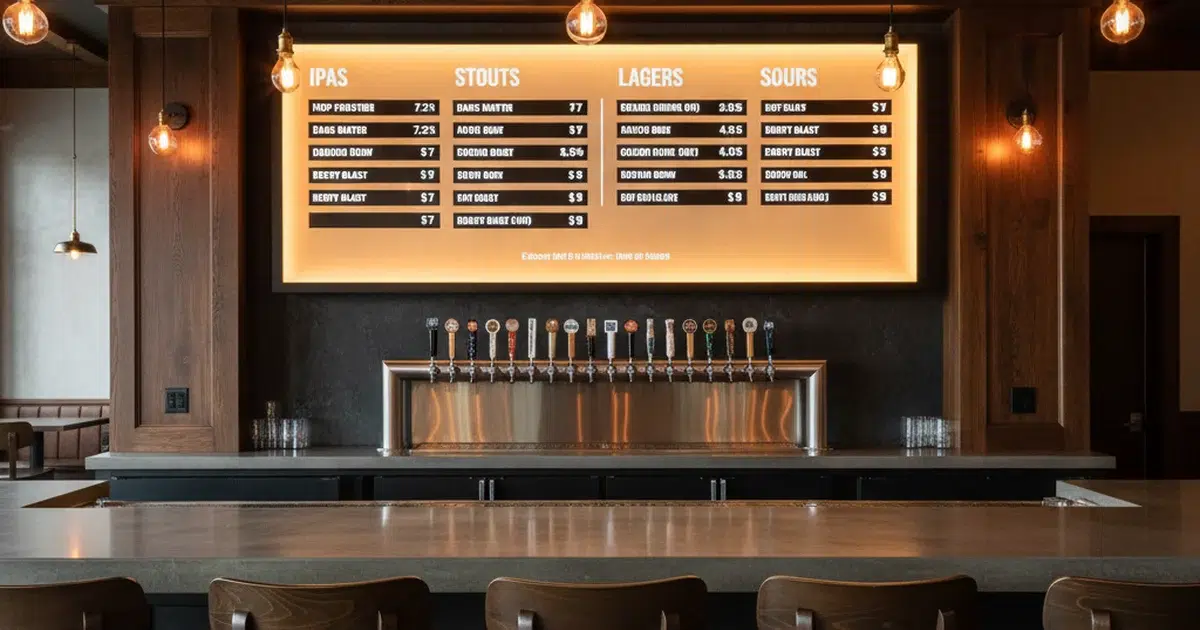
A digital beer menu is one of the simplest upgrades a bar, taproom, or craft brewery can make — and one of the most impactful. Chalkboards and printed tap lists look great until a beer kicks and someone forgets to erase it. Customers order something that’s no longer available. Staff apologize. The experience takes a hit before a single pint is poured. A digital beer menu solves that problem at the source, giving operators real-time control over what guests see the moment they walk in the door.
Why Bars Are Moving Away From Chalkboards
Chalkboards have charm. Nobody’s arguing that. But charm doesn’t update itself at 9pm on a Friday when your last keg of the seasonal IPA blows. A digital beer menu board does.
The shift away from static menus isn’t about aesthetics — it’s about accuracy. When your tap list display is wrong, guests lose trust. And in a craft beer environment where your selection is the main draw, a stale menu is a real problem.
Here’s what operators consistently run into with static menus:
- Beers listed that are no longer on tap
- Prices out of date after seasonal changes
- No way to highlight limited releases or specials quickly
- Staff spending time answering “what do you have on draft?” instead of serving
- Guests walking in, seeing an outdated list, and doubting the whole operation
A digital tap list removes every one of those friction points. Updates take seconds. The screen always reflects what’s actually pouring.
One taproom that made the switch described a pattern that will sound familiar to a lot of bar owners — rotating taps so frequently that staff couldn’t keep up with updating the chalkboard. After switching to a digital beer menu, floor staff stopped spending the first hour of every shift correcting the board and started spending it talking to guests about what was actually on.
What a Digital Beer Menu Actually Does
A digital beer menu board is a screen — or set of screens — displaying your current tap list, beer details, pricing, and any specials. That’s the simple version. The real value is in what sits behind it.
Good beer menu board software lets you:
- Update your list from any device, anywhere, instantly
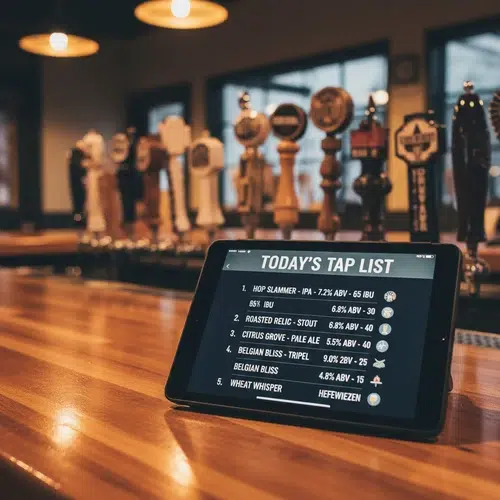
- Display beer names, styles, ABV, IBU, and tasting notes
- Organize by category — IPAs, lagers, stouts, sours, rotating taps
- Highlight featured beers, new arrivals, and limited releases
- Schedule menu changes in advance for events or seasonal rotations
- Match your brand — colors, fonts, logos, layout
A well-built taproom digital menu doesn’t just list what’s on tap. It sells it. When a guest can read that your West Coast IPA has citrus and pine notes at 6.8% ABV, they’re already deciding whether they want a pint before they’ve reached the bar.
The Real-Time Advantage for Taprooms
Taprooms run differently than traditional bars. Rotating taps, small-batch releases, and experimental brews mean your digital tap list might change multiple times a week. Sometimes multiple times in a single day.
That pace is impossible to keep up with on a chalkboard. It’s not even realistic with a printed menu. A digital beer menu built for taproom volume handles this without any strain.
You kick a keg — remove it from the screen in under 30 seconds. You tap something new — add it with the style, tasting notes, and price before the first pint is poured. No erasing, no reprinting, no calling over a manager to update a sign.
This matters especially during busy service. Guests make faster decisions when your craft beer menu is clear, current, and well-organized. Faster decisions mean faster service. Faster service means more covers and higher revenue per hour of operation.
According to research published by the National Restaurant Association, operators who use digital displays report measurable increases in upsell success — customers are more likely to order premium items when they’re highlighted visually.
How to Set Up Your Digital Beer Menu
Getting a digital beer menu board running doesn’t require a full AV installation or a technical team. Here’s the basic path most taprooms and bars follow:
Step 1: Choose Your Hardware
Most operators use commercial-grade TVs or displays mounted behind or above the bar. Size depends on the space — a small taproom might use one 55-inch screen; a larger venue might run two or three displays. You’ll need a media player or smart display device that connects to your menu software.
Step 2: Choose Your Software
This is the important part. Your digital menu board software is what makes the screen work. Look for something purpose-built for bars and taprooms — not generic signage software that wasn’t designed with beer lists in mind. You want ABV and IBU fields, style categories, and the ability to update from your phone mid-service.
Step 3: Build Your Menu Layout
Organize your digital tap list by category. IPAs together, lagers together, seasonals and rotating taps clearly labeled. Use your brand colors. Make pricing visible without being the first thing a guest reads. Your beer menu board should lead with what makes the beer interesting, not just what it costs.
Step 4: Connect and Go Live
Connect your display to the software, push your menu, and you’re live. Any update you make in the software reflects on the screen in real time. From that point forward, managing your digital beer menu takes minutes, not hours.
For a deeper look at how digital menu boards for breweries can be optimized for taproom environments specifically, including layout strategies and content hierarchy, there’s a full breakdown worth reading before you finalize your setup.
Digital Beer Menu Design: What Makes One Work
Not all digital beer menu boards are equal. A poorly designed screen — too much text, wrong font size, no visual hierarchy — is worse than no screen at all. Guests give up trying to read it and just ask the bartender anyway.
Here’s what separates a high-performing craft beer menu display from one that gets ignored:
- Readable at distance — minimum 36pt font for beer names, legible from 15 feet
- Clear categories — organize by style, not just alphabetically
- Essential details only — name, style, ABV, price. Tasting notes are a bonus, not a requirement
- Visual anchors — highlight a “featured pour” or “staff pick” to guide decision-making
- Brand consistency — your taproom digital menu should look like it belongs to your space
- Contrast — dark background with white or light text reads best in bar lighting
The best bar menu display formats treat the screen like a conversation starter, not a spreadsheet. If your digital tap list reads like a database export, it needs a redesign.
For more on how menu engineering with digital boards can actively increase average check size and drive upsells, the principles apply directly to beer menus — especially how placement and visual emphasis influence what guests order first.
Digital Beer Menus for Different Venue Types
A digital beer menu works differently depending on the type of venue running it. Here’s how the use case shifts:
| Venue Type | Primary Use Case | Key Feature Needed |
|---|---|---|
| Taproom / Brewery | Real-time tap rotation updates | Instant publish, mobile updates |
| Sports Bar | High-volume display, multiple screens | Multi-screen sync, pricing prominence |
| Gastropub / Restaurant | Pairing suggestions, seasonal features | Rich text fields, featured beer module |
| Hotel Bar | Upscale presentation, brand-matched design | Custom branding, minimal layout |
| Beer Garden / Outdoor | Visibility in daylight, simple navigation | High-contrast display, large font sizes |
Each of these environments benefits from a digital tap list — but the setup, layout, and priorities shift based on how guests interact with the space. A taproom with 20 rotating handles needs different logic than a hotel bar with a curated list of eight.
If your venue runs a food menu alongside your beer program, pairing your digital beer menu board with a coordinated digital menu board for restaurants creates a unified experience that guests notice — and that staff find easier to keep current.
Common Mistakes to Avoid With Your Digital Beer Menu
Most operators don’t run into problems with hardware or software. They run into problems with habits. Here are the mistakes that undercut a good digital beer menu setup:
- Not removing kicked beers immediately — a guest who orders something unavailable won’t forget it
- Listing too many beers at once — if your digital tap list has 40 items on one screen, guests freeze instead of choosing
- Ignoring pricing updates — a price mismatch between your screen and what staff charge creates friction every time
- Skipping brand customization — a generic-looking beer menu board doesn’t build your identity
- Not training staff on the system — if bartenders can’t update the menu themselves during service, the real-time advantage disappears
The operators who get the most out of a digital beer menu are the ones who treat updating it as part of the service routine — not as an IT task. When the person tapping the keg is also the person updating the screen, the system works exactly as intended.
For venues looking to tie their digital beer menu board into a broader revenue strategy, how to increase bar revenue covers the full picture — including how digital menu placement directly influences drink selection and average spend per guest.
Frequently Asked Questions About Digital Beer Menus
| Question | Answer |
|---|---|
| What is a digital beer menu? | A digital beer menu is a screen-based display showing your current tap list, beer details, and pricing — updated in real time via software instead of manually. |
| How much does a digital beer menu board cost? | Hardware costs vary from $200–$800 for a commercial display. Software subscriptions typically range from $30–$150/month depending on features and number of screens. |
| Can I update my digital tap list from my phone? | Yes. Most modern digital beer menu software allows real-time updates from any device with an internet connection, including smartphones. |
| How many screens do I need? | Most small-to-mid taprooms operate with one to three screens. Larger venues with multiple bar areas benefit from synced multi-screen setups. |
| Can a digital beer menu display ABV and IBU information? | Yes. Purpose-built beer menu software includes fields for ABV, IBU, style, tasting notes, and more — all visible on the screen. |
| Does a digital beer menu board require WiFi? | Most cloud-based systems require an internet connection to push updates. Some systems cache the last-known menu locally for display if connectivity drops. |
Local Resources for Bar and Taproom Operators
| Resource | Description |
|---|---|
| Brewers Association | National trade organization for craft brewers — resources on brewery operations, compliance, and industry trends. |
| National Restaurant Association | Industry data, technology guides, and operational resources for bar and restaurant operators. |
| Beer Institute | National industry organization providing regulatory guidance, market data, and advocacy for beer retailers and producers. |

Make Your Tap List Work as Hard as Your Beer Does
Your beer deserves better than a chalkboard that can’t keep up with your taps. A digital beer menu gives guests accurate, engaging information the moment they walk in — and gives you the control to keep it that way without climbing a ladder. Evergreen HQ builds digital beer menu board software specifically for bars, taprooms, and breweries that need real-time control without the technical overhead. Start your free trial or book a demo to see how Evergreen handles your digital tap list — and every update after it. When your digital beer menu is always accurate, your bar runs better.

About Casey Marte
Senior Technical Content & Product Marketing Strategist
Casey Marte is a Senior SEO & Digital Marketing Strategist at EvergreenHQ. With over 14 years of experience across content strategy, search optimization, and now AI-driven marketing, she specializes in making complex digital concepts practical for the operators who need them most.
At EvergreenHQ, Casey brings a data-first mindset to everything from how your business ranks in search to how your brand shows up across platforms. Whether you’re running a single taproom or a growing multi-unit restaurant group, she’s focused on making sure your digital presence works as hard as your team does.