
Google My Business for restaurants is one of the highest-ROI tools available to any bar or restaurant operator — and most operators are using it at about 20% of its actual capability. A fully optimized Google Business Profile puts your restaurant in front of guests at the exact moment they’re searching for a place to eat or drink — often within a mile of your location. This guide covers every Google My Business feature that matters for restaurants and bars, how to set them up correctly, and how pairing your Google Business Profile with real-time digital menu software creates a seamless guest experience from search to seat.
Table of Contents
ToggleWhy Google My Business Is Essential for Restaurants
Before a guest ever steps foot in your bar or restaurant, they’ve almost certainly found you on Google. According to BrightLocal’s Local Consumer Review Survey, 87% of consumers use Google to find and evaluate local businesses — and restaurants are one of the most searched business categories on the platform. Your Google Business Profile is effectively your digital storefront, and it needs to be as carefully maintained as your physical one.
- Local pack placement — A fully optimized profile ranks in Google’s “local pack” — the map and three listings that appear above organic search results. This is premium digital real estate that costs nothing but time to maintain.
- Direct booking and reservations — Google allows restaurants to add reservation links directly to their profile, reducing friction between search and visit.
- Menu display — Your menu can be displayed directly in Google Search — meaning a guest can see what you serve before they even click to your website.
- Review management — Your Google reviews are often the first thing a new guest reads. Actively managing them is a direct revenue activity.
Keep Every Menu Consistent — Google, Website, and In-Venue Boards
Join 4,500+ restaurants, bars, and breweries using Evergreen to modernize their menus.
The Key Google My Business Features for Restaurants
1. Menu Integration
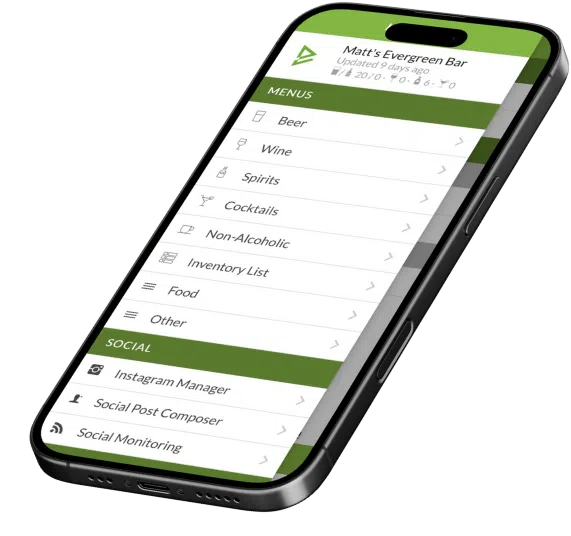
Google allows restaurants to upload their menu directly to their Google Business Profile — displaying items, descriptions, and prices in search results. Keep this updated and consistent with your actual menu. When your menu changes — new cocktails, seasonal items, price updates — your Google menu should reflect that immediately. Evergreen’s digital menu software keeps your in-venue boards and website menu current; pair that with a regular Google menu update to ensure consistency across every touchpoint.
2. Google Posts
Google Posts are short updates that appear directly in your Google Business Profile in search results — like a mini social media feed that shows up when someone searches for you. Use them to promote: weekly specials, new menu items, events, happy hour offers, and seasonal launches. Posts expire after 7 days, so a weekly cadence is ideal. This is one of the most underutilized features in restaurant Google My Business management.
3. Q&A Section
Google allows anyone to ask and answer questions about your business publicly. Proactively add and answer the questions your guests most commonly ask: “Do you have gluten-free options?”, “Is there parking?”, “Do you take reservations?”, “Are dogs allowed on the patio?” Seeding your Q&A with accurate answers prevents misinformation from public-submitted answers.
4. Photos and Video
Businesses with 100+ photos on their Google Business Profile get 520% more calls and 2,717% more direction requests than businesses with no photos, according to Google’s own data. For restaurants and bars, high-quality food and drink photography is non-negotiable. Upload new photos weekly — cocktail shots, food plating, the bar atmosphere, events. And actively flag and remove poor-quality user-submitted photos that don’t represent your brand.
5. Attributes and Labels
Google allows restaurants to set specific attributes on their profile: “Dine-in,” “Takeout,” “Delivery,” “Outdoor seating,” “Live music,” “Dogs allowed,” “Happy hour,” “LGBTQ+ friendly.” These attributes surface your business in filtered searches — someone searching specifically for “bars with outdoor seating near me” will only see you if that attribute is set. Review your attributes quarterly and keep them current.
6. Review Management
Responding to every review — positive and negative — is a direct reputation management activity. Google surfaces review responses in search results. A professional, empathetic response to a negative review can neutralize its impact and actually demonstrate your customer service standards to future guests reading it. Set a goal of responding to every review within 48 hours.
Google My Business Optimization Checklist for Restaurants
| Task | Frequency | Priority |
|---|---|---|
| Verify and complete all business information (hours, phone, website, address) | One-time + as needed | 🔴 Critical |
| Upload and maintain menu | With every menu change | 🔴 Critical |
| Add new photos | Weekly | 🟡 High |
| Publish a Google Post | Weekly | 🟡 High |
| Respond to all reviews | Within 48 hours | 🔴 Critical |
| Review and update attributes | Quarterly | 🟡 High |
| Seed and answer Q&A section | One-time + monitor monthly | 🟢 Medium |
| Update holiday hours | Before every holiday | 🔴 Critical |
4,500+ Restaurants and Bars Trust Evergreen for Menu Accuracy
Join 4,500+ restaurants, bars, and breweries using Evergreen to modernize their menus.
Frequently Asked Questions About Google My Business for Restaurants
| Question | Answer |
|---|---|
| Is Google My Business free for restaurants? | Yes — Google Business Profile is completely free to create and manage. |
| How do I add my menu to Google My Business? | Log in to your Google Business Profile, navigate to “Menu” in the dashboard, and add items manually or via URL if you have an online menu. |
| How often should I post on Google My Business? | Weekly — Google Posts expire after 7 days, so a weekly cadence keeps your profile active and your specials visible in search results. |
| Does responding to Google reviews help my ranking? | Yes — active review management is a positive ranking signal. It also demonstrates responsiveness to future guests reading your profile. |
| What photos should I upload to Google My Business? | Food, cocktails, your bar/dining room atmosphere, your team, events, and your exterior. Aim for 100+ photos — businesses with more photos get dramatically more profile views. |
| How does Google My Business affect my local SEO? | A complete, active profile is one of the strongest local SEO signals. It directly influences whether you appear in the local pack for high-intent searches like “bars near me” or “best cocktails [city].” |
Optimize Your Google Business Profile — Then Make Sure Your Menu Matches
A fully optimized Google My Business profile puts your restaurant in front of guests when they’re ready to make a decision. Pair it with Evergreen’s digital menu software to ensure your in-venue boards, website menu, and Google menu all reflect the same accurate, current information — no discrepancies, no disappointed guests, no lost revenue from menus that don’t match. Join 4,500+ operators running tighter digital operations. Start your free trial today.
About Evergreen
Evergreen is digital menu software built for bars, restaurants, and breweries. Since 2010, Evergreen has helped 4,500+ operators keep their digital menu boards, website menus, and print menus accurate and consistent — from a single dashboard, in real time.





