How to Write Digital Menu Descriptions That Sell on Screens
Great digital menu descriptions can lift sales by twenty percent or more. Yet most operators treat menu copy as an afterthought. They paste old print descriptions onto screens without adjusting for readability. Menu copywriting for displays follows different rules than paper menus. Screens demand shorter text, clearer hierarchy, and bolder formatting. Digital menu boards let you test and tweak copy instantly. This walkthrough shows you how to audit, rewrite, and test digital menu descriptions for maximum impact. You will see before and after examples plus practical formatting tips for your screen menu text.
Restaurant Owners See Evergreen’s Digital Menu Software in Action
Join 4,500+ restaurants, bars, and breweries using Evergreen to modernize their menus.
Step 1: Audit Your Current Menu Descriptions
Start by photographing every digital menu board in your venue. Stand where your customers stand. Can you read the screen menu text from ten feet away? If not, your copy is too long. Pull up your current menu item descriptions and rate each one against three criteria:
- Length: Does the description fit on two lines or fewer at your display size?
- Clarity: Can a first-time guest understand the dish in under three seconds?
- Appeal: Does the copy make you hungry, or does it read like an ingredient list?
Print menus allow longer paragraphs because guests hold them close. Digital menu descriptions must work at a distance. According to Restaurant Business Online, guests do not want to spend too much time reading descriptions. That rule doubles on screens.
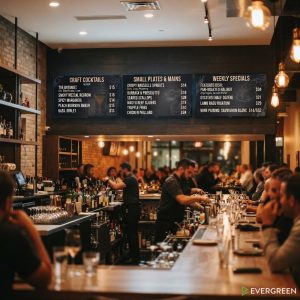
A common scenario plays out in busy bar environments. A manager who used to climb ladders to swap static boards switched to digital menu software. The cleaner screen presentation immediately made menu descriptions easier to read from across the room. Staff updated items in minutes instead of reprinting boards.

Step 2: Rewrite for Screens
Now that you have audited your copy, rewrite each menu item description with screens in mind. Three factors drive screen readability: length, hierarchy, and formatting.
Length Rules for Screen Reading
Aim for eight to twelve words per digital menu description. That is roughly one to two lines on most displays. Anything longer forces guests to squint or step closer. Keep your screen menu text tight by following these rules:
- Drop filler words like “prepared with” or “served alongside”
- Lead with the most appetizing ingredient or technique
- Save dietary tags for a separate line or icon
- Cap descriptions at two sentences, ideally one
Concise menu descriptions do more than save space. They speed up ordering lines during rushes. The National Restaurant Association reports that efficiency and speed remain top consumer priorities. Short copy on digital menu boards directly supports both goals.
Visual Hierarchy on Digital Displays
Hierarchy guides the eye through your digital menu descriptions. Item names should always be the largest text element. Descriptions sit below in a smaller weight. Prices align to the right edge for easy scanning. Never bury prices in the middle of a description block.
Use these hierarchy levels for every digital menu description:
- Level 1: Item name, largest font, bold
- Level 2: Short description, medium font, regular weight
- Level 3: Price, medium font, right-aligned
Good hierarchy reduces decision fatigue. Guests scan names first, then read details for items that catch their eye. Learn more about layout principles in our digital menu design templates guide.
Formatting for Legibility
Formatting choices determine whether digital menu descriptions sell or stall. Use these formatting standards:
- Font size: Minimum 24 point for body text on a 1080p display
- Line spacing: Add 20 percent spacing between description lines
- Contrast: Dark text on light backgrounds, or vice versa
- Bold keywords: Highlight signature ingredients within descriptions
Effective menu copywriting also uses white space strategically. Leave breathing room around each menu item description. Crowded text on digital menu boards forces guests to work harder. Psychology research on menu design psychology shows that clutter reduces order accuracy.
Restaurant Owners See Evergreen’s Digital Menu Software in Action
Join 4,500+ restaurants, bars, and breweries using Evergreen to modernize their menus.
Before and After Examples
Let us look at real before and after rewrites of digital menu descriptions. These examples show how trimming and restructuring transforms screen readability.
Example 1: Burger Section
Before: “Our signature Classic Burger features a hand-ground beef patty made from locally sourced chuck, topped with aged cheddar, crisp lettuce, vine-ripened tomato, red onion, and house-made pickles, all served on a toasted brioche bun with our special sauce.”
After: “Classic Burger. Hand-ground chuck patty, aged cheddar, house pickles, brioche bun.”
The before version runs 38 words. The after version runs 12 words. Both communicate the same dish. The digital menu description after version lets guests read and decide in seconds. This approach aligns with tips from Modern Restaurant Management on keeping descriptions visually quiet on boards.
Example 2: Cocktail Section
Before: “Our Smoked Old Fashioned is crafted with Bulleit Rye Whiskey, house-made demerara syrup, aromatic bitters, and a touch of orange oil, finished with a hand-carved ice cube and an applewood smoke dome for a truly unforgettable experience.”
After: “Smoked Old Fashioned. Bulleit Rye, demerara syrup, orange bitters, applewood smoke.”
The before version uses 32 words and reads like a press release. The after version uses 10 words and still sells the drink. Strong digital menu descriptions strip away filler while keeping the ingredients that sell.

Example 3: Salad Section
Before: “Fresh seasonal greens tossed with shaved fennel, candied walnuts, dried cranberries, goat cheese crumbles, and a light champagne vinaigrette, topped with grilled chicken breast marinated in herbs and olive oil.”
After: “Harvest Salad. Seasonal greens, goat cheese, candied walnuts, champagne vinaigrette. Add grilled chicken.”
Notice how the after version splits the add-on into a separate phrase. This modular approach to digital menu descriptions lets guests build their order without rereading. For more on structuring items, see our menu engineering guide.
Step 3: Test and Measure Results
Writing better digital menu descriptions is only half the battle. You need to test and measure. Start with an A-B swap. Run your old descriptions for one full week. Then switch to the rewritten digital menu descriptions for the same period. Compare these metrics:
- Item sales volume: Did the rewritten items sell more units?
- Average check size: Did guests add more items or modifiers?
- Order speed: Did line times drop during peak hours?
- Customer questions: Did staff field fewer clarification questions?
Track these numbers using your POS data. If you need a primer on connecting systems, read our guide on POS integration with digital menus. The revenue impact of digital menu boards becomes measurable when you isolate copy as the variable.
The right digital menu software lets you update descriptions in seconds. Push changes to every screen instantly without reprinting anything.
Frequently Asked Questions About Digital Menu Descriptions
| Question | Answer |
|---|---|
| How long should digital menu descriptions be? | Aim for 8 to 12 words per item. That fits one to two lines on most screens and keeps guests scanning quickly. |
| What font size works best for screen menu text? | Use at least 24 point body text on a 1080p display. Larger is always better for readability at a distance. |
| Should I include dietary tags in menu descriptions? | Yes, but keep them separate. Use icons or a short tag line below the description instead of crowding the main copy. |
| How often should I update digital menu descriptions? | Review them monthly. Swap underperforming copy immediately since digital menu software lets you push updates in seconds. |
| Do digital menu descriptions need different copy than print menus? | Yes. Screens require shorter text, larger fonts, and tighter formatting than printed menus that guests hold close. |
Writing Menu Copy That Works on Every Screen
Better digital menu descriptions start with a simple audit and end with measurable results. Trim your copy, sharpen your hierarchy, and test every change. Evergreen makes it easy to update digital menu descriptions across all your screens in seconds. Ready to rewrite your menu for screens? Book a Demo today.
Restaurant Owners See Evergreen’s Digital Menu Software in Action
Join 4,500+ restaurants, bars, and breweries using Evergreen to modernize their menus.

About Casey Marte
Senior SEO & Digital Marketing Strategist, EvergreenHQ
Casey Marte is a Senior SEO & Digital Marketing Strategist at EvergreenHQ, with over 14 years of experience across content strategy, search optimization, and AI-driven marketing. She specializes in making complex digital concepts practical for the operators who need them most.
At EvergreenHQ, Casey brings a data-first mindset to everything from how your business ranks in search to how your brand shows up across platforms. Whether you are running a single taproom or a growing multi-unit restaurant group, she is focused on making sure your digital presence works as hard as your team does.