Holiday menu management is planning, updating and promoting your seasonal menu from November through New Year’s Eve. It covers specials, party menus, holiday cocktails and gift card offers. Evergreen has helped more than 4,500 bars, restaurants and local businesses run their menus since 2012. With Evergreen’s digital menu software, one change updates your boards, website menu and print files at once. That matters when items sell out mid-shift. This guide covers a six-week plan, six revenue strategies and a timeline you can copy. Here is how to run your holiday menu without the scramble.
Table of Contents
Toggle
Why Holiday Menu Management Is Harder Than Other Seasons
The holidays are busier, and your menu changes more often. Many venues run a regular menu, a holiday prix fixe, seasonal cocktails and promotions at the same time. Any of these can change with little notice. A key cocktail ingredient runs out. A prix fixe night sells out. A limited beer release kicks early. Without real-time digital menu management, guests order items you no longer have. That frustrates guests and slows service at your busiest point of the year.
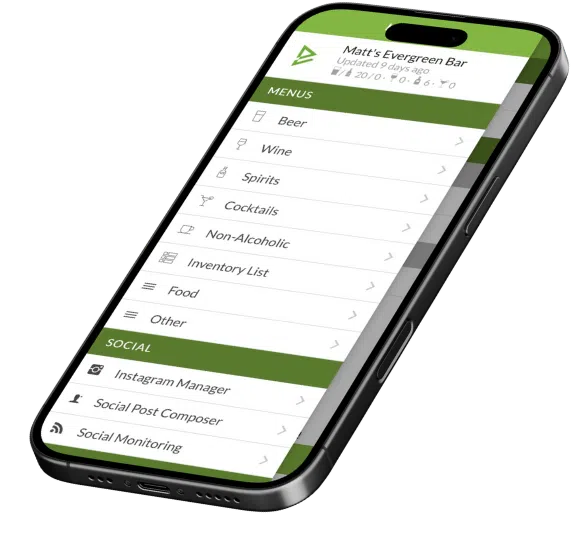
Update Your Holiday Menu Instantly on Every Channel
One change in Evergreen updates your in-venue boards, website menu, and print files simultaneously.
6 Holiday Menu Management Strategies That Grow Seasonal Revenue
1. Build Your Holiday Menu Six Weeks Out
Lock in seasonal offerings by mid-October. That leaves time to cost the menu, source ingredients and train staff. It also lets you start promoting before competitors do. Tease the lineup on your digital boards and social channels to capture early reservations.
2. Keep the Holiday Menu Separate
Run holiday items as their own section or standalone menu. Do not scatter them through your regular menu. A separate layer is easy to add and remove in January. It also makes the holiday items feel limited, which helps them sell.
3. Feature Limited Items on Your Digital Boards
Your in-venue digital menu boards are your strongest holiday sales tool. Feature limited cocktails, seasonal specials and gift cards where every guest can see them. When an item sells out, remove it right away. Need drink ideas? Start with our winter cocktail menu ideas.
4. Sync Your Online and In-Venue Holiday Menus
Holiday guests check your menu online before they book. If your website menu shows last month’s items, you lose them at the booking stage. Evergreen updates your website menu and in-venue boards together. One update covers every channel.
5. Automate Dayparts for Holiday Service
Holiday brunch, dinner and late-night New Year’s Eve each need different items and prices. Schedule your dayparts so menus switch on their own. Brunch shows in the morning and dinner takes over at 5 p.m. No one has to touch the system mid-shift.
6. Promote Gift Cards on Every Screen
Gift cards bring in revenue now and repeat visits later. Feature them on your digital boards through November and December. A rotating gift card slide on your tap list reaches guests who are already in the building. Learn more in our guide to restaurant gift cards.
Pair your menu plan with a festive room. Our holiday decor ideas for bars and restaurants show how.

| Holiday Menu Timeline | Action |
|---|---|
| Mid-October | Finalize holiday menu, cost out items, place ingredient orders |
| Late October | Load holiday menu into Evergreen, begin digital board promotion |
| Early November | Staff training on holiday menu items and upsell language |
| Thanksgiving week | Launch full holiday promotion: gift cards, seasonal cocktails, special events |
| December | Monitor and update daily: remove sold-out items, add new limited specials |
| New Year's Eve | Switch to NYE menu via Evergreen daypart automation |
4,500+ Operators Trust Evergreen During Their Busiest Season
Real-time holiday menu updates. No reprinting, no lag, no guest-facing errors.
Holiday Menu Management FAQs
When should I start planning my holiday menu?
About six weeks before launch. For a menu that starts in November, plan it in mid-October. That gives you time for costing, sourcing, training and promotion.
Can I run more than one holiday menu at a time?
Yes. Use daypart scheduling to show a different menu for brunch, dinner and late night. Evergreen switches them automatically.
What should I show on holiday digital menu boards?
Limited cocktails, seasonal specials, gift card offers and upcoming events. Remove items as soon as they sell out. Plan ahead for Super Bowl Sunday, the next big menu moment after New Year's.
Run Your Holiday Menu With Confidence This Season
Plan early, keep the menu separate and update it in real time. That is how the best operators turn their busiest season into their most profitable one. Evergreen’s digital menu software keeps your holiday menu accurate on every screen, every day. Start your free trial today or book a demo.
>