

When someone searches for something online, they’re highly likely to visit a business or purchase a product. In fact, a full 93% of people searching end up buying. And if you’re a bar or restaurant, that’s a big, fat deal. Searches for restaurants more than doubled from 2015 to 2017, meaning chances are good that a lot of people are looking for you online. That’s where Google comes in. Your Google My Business and Google Maps listings are critical to your business’ search rankings and online presence. But when we checked 877 bar and restaurant profiles, we found that a full 71% had not yet claimed their Google My Business page. If you’re one of them, you need to fix this fast. Read on for instructions on how to quickly claim your Google My Business Page and drive prospective customers straight to you.

How to Add a New Google My Business Page
Step 1: Head to https://business.google.com/locations
Step 2: Create or sign into your Google account.
Step 3: Follow the prompts, adding your business name, address, category (e.g. cocktail lounge, diner, Colombian restaurant) and contact information. If a Google My Business profile already exists for your location, follow the steps below to request ownership.
Step 4: Verify your business.
You can also download the Google My Business app (Android | iPhone) and do all this from your phone.
[LEARN MORE] AUTOMATE MENU UPDATES WITH EVERGREEN
How to Request Ownership of an Existing Google My Business Page
Step 1: Click business.google.com/add
Step 2: Follow the prompts, including adding the name and address or your business.
Step 3: Complete a request access form, which will send an email to the current owner so they can contact you.
For more details, see Google’s complete instructions.
How to Claim Your Bar or Restaurant on Google Maps
Step 1: Open the Google Maps app on your phone (Android | iPhone) or search for your business on a desktop.
Step 2: If your business location has not been claimed, you will see Claim this business at the bottom of the profile. Click it.
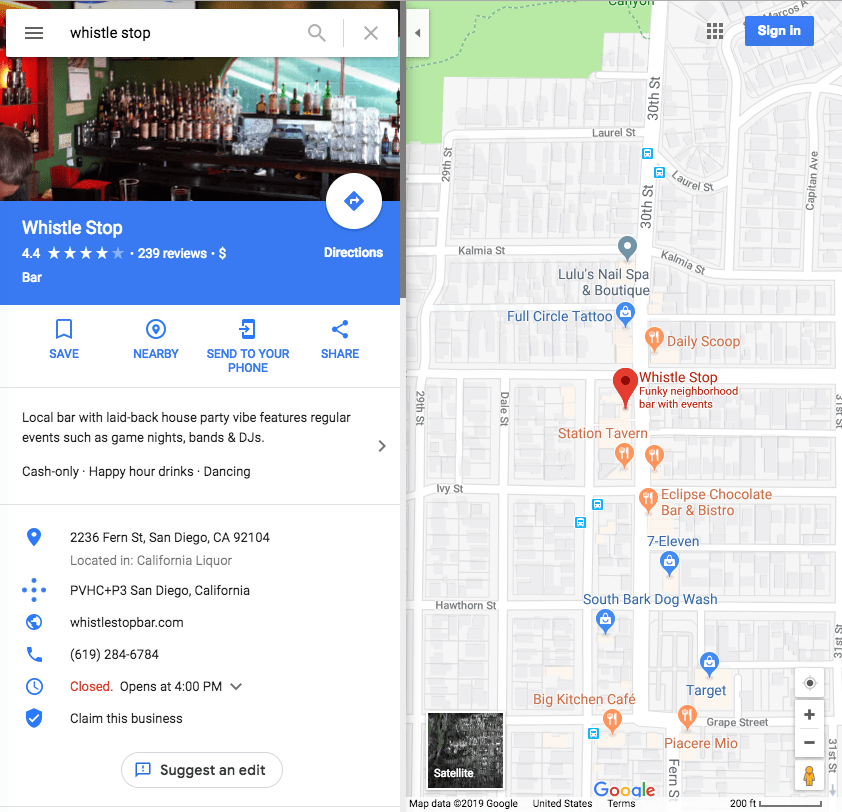
Step 3: You will then be prompted to verify basic information about your business, including name, business category, contact information, etc.

Step 4: The final step is to verify your business location, which is usually done by mail or phone.
Now that you’ve added a Google My Business page and claimed your Google Maps listing, you’re ready to take advantage of powerful features like reviews and menu buttons. Get ready for the happy hour rush!





